2007년 1월 7일 일요일

2007년 1월 6일 토요일
2007년 1월 2일 화요일
Exploring the XML File Formats
[MS Open XML]
http://msdn2.microsoft.com/en-us/office/aa905362.aspx
Article
Learn about the components that are included in a formatted file and about several scenarios that show the versatility of these files.
Easily exchange data between Office applications and enterprise systems
DOWNLOAD
Download a set of sample files and Visual Studio project files that illustrate how to manipulate Office Open XML format documents programmatically.
Based on a submission from Microsoft, this Standard defines Office Open XML's vocabularies and document representation and packaging for the "Office 12" versions of Word, Excel, and PowerPoint.
Download and install these snippets to your Visual Studio code snippet folder, and then use them when customizing Excel 2007, PowerPoint 2007, and Word 2007.
Generate, read and modify documents without going through the object model of the hosting Office application.
Brian Jones gives an 8-minute demo around the Open XML formats, including key things that go into building a document.
Mauricio Ordonez, Doug Mahugh, Kevin Boske and Brian Jones discuss the Office Open XML file formats.
-----------------------------------
[참조] http://chilco.textdrive.com/~dmahugh/2006/01/09/exploring-the-xml-file-formats/
This is a continuation of the XML File Formats Overview post …
In a previous post, we covered the basic concepts behind the new Office Open XML file formats. Now let’s look at an example in a little more detail, to get a feel for how the new file formats work.

We’ll just create a new Word document and type “Hello Word!” into it. We’ll change the font to 24pt bold Segoe UI, to see how some of the basic formatting is handled, and then we’ll save the file as HelloWorld.docx.
Next, let’s rename that file and change the extension from DOCX to ZIP. Note that the icon associated with the file changes — Windows now sees it as a ZIP archive instead of a Word document. And since it’s a ZIP file now, we can explore its contents with WinZip, WinRAR, PKZIP, or any other ZIP compression tool.

So if we double-click the HelloWorld.zip file, we can see the contents. In our example file the contents look like this:

You can see that the document contains three folders, and something called [Content_Types.xml]. The “word” folder contains the actual content of the document, so let’s drill down into that folder. Here’s what it contains:

Again, we’re going to just focus on the actual content of the document, and that’s contained in the document.xml file. Click the thumbnail image to the right to take a look, then click your Back button to come back to this page.

Note that you can change the contents of the file by editing the XML file directly — you don’t need Word to do this! As an extreme example, you could send a Word or Excel document created in Office 12 to somebody working on the original IBM PC (running PC-DOS from 1981), and as long as they have PKZIP installed they could edit the file. More commonly, if you have WinZIP or PKZIP installed, you can drag a copy of document.xml to your desktop, edit it with Notepad, then drop it back into the ZIP container, change its extension from ZIP to DOCX, and you’ve made your change to the file.
Want to explore an Office 12 document yourself, but you’re not on the beta program? No problem, here’s a copy of the HelloWorld.zip file used for this little example.
This was a very simple demo, just to show the basic concepts. When we get back to this topic (it may be a while, I’m travelling a lot this month), we’ll look at how the new file formats handle embedded pictures and other binary objects. As with this example, the details are surprisingly simple and straightforward after you know the underlying architecture of the XML file formats.
One Response to “Exploring the XML File Formats”
2006년 12월 28일 목요일
道의 핵심은 지행합일(知行合一)
| 道의 핵심은 지행합일(知行合一) | ||
| ||
http://blog.naver.com/mokpojsk
2006년 12월 25일 월요일
현서와 크리스마스 보내기 (예림 유치원 발표회)
http://picasaweb.google.com/outofwrd/200612
모두 축소 | 모두 확장]
-
자세히 »

눈사람 만들기 1단계 눈을 뭉친다. 둥굴게 둥굴게,..^^ 현서야! 더크게 더크게... 아이구!! 아빠가 더작네...
1000.JPG
날짜: 2006. 12. 25 오전 12:31
Number of Comments on Photo: 1
-
자세히 »

눈사람 만들기 2단계, 눈덩이를 위로 올린다. ^^ 와! 우리 현서 힘 세네.. 그걸 어떻게 올렸니... 혼자서 올리다니.. 크헉
1001.JPG
날짜: 2006. 12. 25 오전 12:31
Number of Comments on Photo: 1
-
1002.JPG자세히 »

눈사람 만들기 3단계, 이제 토토로 모습으로 꾸미기.. ^^ 현서 보다 키가 크네.. 토토로는 갑자기 생각이 났어요. ^^ 어그제 본 에니를 보고 생각이 나서 현서와 같이 만듬..
1002.JPG
날짜: 2006. 12. 25 오전 12:31
Number of Comments on Photo: 1
-
자세히 »

현서 예림 유치원 음악회에서 멋지게 탬버린을 연주하는 모습.. 어엿한 어른이 된것 같아요. ^^
SSL22325.JPG
날짜: 2006. 12. 25 오전 12:31
Number of Comments on Photo: 1
예림 유치원 홈페이지 -
자세히 »
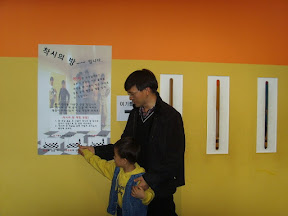
23일 가족끼리 국립 과학관에 가서 다빈치전에 가다. 착시의방을 보고서 현서와 같이 글을 읽고 있다.
RES03383.JPG
날짜: 2006. 12. 25 오전 12:31
Number of Comments on Photo: 1
-
자세히 »

현서가 착시의방에서 뛰어 나오고 있다.
SSL22385.JPG
날짜: 2006. 12. 25 오전 12:31
Number of Comments on Photo: 1
-
자세히 »

2006년 크리스마스날 현서가 싼타 할아버지가 가져온 헬기 선물을 들고서 포즈를 취하고 있다. 넘 흥분한 현서를 카메라로 찍지 못한게 아쉽다.
SSL22471.JPG
날짜: 2006. 12. 25 오전 12:31
Number of Comments on Photo: 1
-
자세히 »

2006년 12월 24일 크리스마스 케익을 앞에 두고... 포즈.. 선물에 케익에 .. 그런데 케익이 맛이 없다고 한번먹구 그만.. ^^
SSL22477.JPG
날짜: 2006. 12. 25 오전 12:31
Number of Comments on Photo: 1
-
자세히 »

12월 25일 크리스마스 아침부터 서둘러 해피피트를 보러 가서.. 현서와 같이 요그르트 아이스크림을 먹다. 먹음지그 스럽다. 이타리아 돌?? 제품이란다. 독산 프리머스에서..
2001.JPG
날짜: 2006. 12. 25 오전 12:32
Number of Comments on Photo: 1
-
자세히 »

해피피트를 보기전 포즈 웃어바바 현서야 .. 김치... ^----^
2002.JPG
날짜: 2006. 12. 25 오전 12:32
Number of Comments on Photo: 1
-
자세히 »

해피피트를 보구서 어직두 눈앞에 보이는지... 튀어나올거 같당.. ^^
SSL22549.JPG
날짜: 2006. 12. 25 오전 12:32
Number of Comments on Photo: 1
-
자세히 »

해피피트를 보구서 역시 다컸어... ^^
2003.JPG
날짜: 2006. 12. 25 오전 12:32
Number of Comments on Photo: 1
2006년 1월 11일 수요일
[웹2.0] 데이터는 차세대의「인텔 인사이드」
| [웹2.0] 데이터는 차세대의「인텔 인사이드」 Tim O'Reilly 2006/01/11  |
|


중요한 인터넷 애플리케이션에는 반드시 그것을 지지하는 전문 데이터베이스가 있다. 구글의 웹 크롤, 야후의 디렉토리, 아마존의 제품 데이터베이스, 이베이의 제품 데이터베이스, 맵퀘스트(MapQuest)의 지도 데이터베이스, 냅스터의 분산형 악곡 데이터베이스 등이 그것이다. 지난해 할 베리안은 “SQL이야말로, 차기 HTML이다”라고 말했다. 데이터베이스 관리는 웹 2.0의 핵심 능력이기도 하다. 때문에 이런 애플리케이션은 단지 소프트웨어가 아니고, ‘인포메이션 웨어(infoware)’라고 불리기도 한다. 이 사실은 중요한 물음, 즉 “그 데이터를 소유하고 있는 것은 누구인가”라는 물음을 던진다. 인터넷 시대에는 데이터베이스를 컨트롤하여 시장을 지배해, 막대한 수익을 올린 기업이 적지 않다. 초기에 정부의 위탁을 받고 네트워크 솔루션(Network Solutions, 후에 베리사인이 인수)이 독점한 도메인명 등록 사업은 인터넷에 있어서의 최초의 달러 박스 사업이 됐다. 인터넷 시대에는 비즈니스 우위를 확보하는 것은 훨씬 어려워진다고 했지만, 소프트웨어 API를 지배하는 것으로 중요한 데이터 소스를 지배한다면 우위를 확보하는 것은 그렇게 어렵지 않다. 그 데이터 소스가 작성에 막대한 자금을 필요로 하는 것이거나, 네트워크 효과에 의해 수익을 확대할 수 있는 경우는 더욱 그렇다. 예를 들어, 맵퀘스트, 맵스야후닷컴(maps.yahoo.com), maps.msn.com, maps.google.com등이 생성하는 지도에는 반드시 “지도의 저작권은 NavTeq, TeleAtlas에 귀속됩니다”라고 하는 문장이 덧붙여져 있다. 최근 등장한 위성 화상 서비스의 경우는 “화상의 저작권은 디지털 글로브(Digital Globe)에 귀속됩니다”라고 쓰여져 있다. 이런 기업은 막대한 자금을 투자하고 독자적인 데이터베이스를 구축했다. 내브텍(NavTeq)은 7억 5000만 달러를 들여 주소/경로 정보 데이터베이스를 구축했고, 디지털 글로브는 공공 기관으로부터 공급되는 화상을 보완하기 위해 5억 달러를 들여 위성을 쏘아 올렸다. 내브텍은 친숙한 인텔 인사이드 로고를 모방해, 카 내비게이션 시스템을 탑재한 차에 ‘NavTeq Onboard(내브텍 탑재차)’라는 마크를 붙이고 있다. 실제 이런 애플리케이션에 있어서, 데이터는 인텔 인사이드라고 불릴 만큼 중요성을 가지고 있다. 소프트웨어 인프라의 거의 모든 것을 오픈 소스 소프트웨어나 상품화한 소프트웨어로 조달하고 있는 시스템에 있어서, 데이터는 유일한 소스 컴포넌트이기 때문이다. 현재 격렬한 경쟁이 전개되고 있는 웹 매핑 시장은 애플리케이션의 핵이 되는 데이터를 소유하는 것이 경쟁력을 유지하는데 있어서 얼마나 중요한가를 나타내고 있다. 웹 매핑이라고 하는 카테고리는 1995년에 맵퀘스트가 만들어 낸 것이다. 맵퀘스트는 선구자였지만, 야후, MS, 그리고 최근에는 구글과 같은 신규 참가자가 부각되도록 했다. 이런 기업은 맵퀘스트와 같은 데이터의 사용 허락을 받아 경쟁되는 애플리케이션을 거뜬히 구축할 수 있었다. 그것과 대조적인 것이 아마존이다. 반스앤노블즈닷컴(Barnesandnoble.com) 등의 경쟁 기업과 같이 아마존의 데이터베이스도 원래초는 R.R. 바우커(Bowker)가 제공하는 ISBN(국제표준도서 번호)을 기초로 한 것이었다. 그러나 맵퀘스트와 달리 아마존은 바우커의 데이터에 출판사로부터 제공되는 표지 화상이나 목차, 색인, 샘플 등의 데이터를 추가하는 것으로, 데이터베이스를 철저하게 확장해 갔다. 더 중요한 것은 이런 데이터에 유저가 코멘트를 달 수 있다는 것이다. 10년 지난 지금은 바우커는 아니고 아마존이 서지 정보의 주요한 정보원이 되고 있다. 소비자뿐만 아니라, 학자나 사서도 아마존의 데이터를 참조하고 있다. 또 아마존은 ASIN이라고 불리는 독자적인 식별 번호도 도입했다. ASIN는 서적의 ISBN에 상당하는 것으로, 아마존이 취급하는 서적 이외의 상품을 식별하기 위해 이용되고 있다. 사실 아마존은 유저의 공급하는 데이터를 적극적으로 수중에 넣어, 독자적으로 확장했던 것이다. 이것과 같은 것을 맵퀘스트가 했다면 어떻게 됐을까. 유저가 지도와 경로 정보로 코멘트를 더해 겹겹이 부가가치를 더할 수 있다면 같은 기초 데이터를 손에 넣는 것만으로, 타사가 이 시장에 참가할 수 없었을 것이다. 최근 등장한 구글 맵스는 애플리케이션 벤더와 데이터 공급자의 경쟁을 실시간으로 관찰할 수 있는 장소가 되고 있다. 구글의 경량 프로그래밍 모델을 이용하고, 서드파티가 다양한 부가가치 서비스를 낳고 있지만, 이런 서비스는 구글 맵스와 인터넷의 다양한 데이터 소스를 조합한 매쉬업의 형태를 취하고 있다. 폴 래이드마처의 하우징맵스닷컴(housingmaps.com)은 구글 맵스와 크래이그리스트의 임대 아파트/판매처 정보를 조합한 인터랙티브인 주택 검색 툴이다. 이것은 구글 맵스를 이용한 매쉬업의 걸출한 예라고 할 수 있다. 현재 이런 매쉬업의 대부분은 기업가들의 눈길을 받고 있다. 적어도 일부의 개발자의 사이에서 구글은 벌써 데이터 소스의 자리를 내브텍으로부터 빼앗아 가장 인기가 있는 중개 서비스가 되고 있다. 향후 몇 년간은 데이터 공급자와 애플리케이션 벤더 사이에서는 경쟁이 전개될 것이다. 웹 2.0 애플리케이션을 개발하기 위해서는 특정 데이터가 극히 중요한 역할을 완수하는 것을 양방이 이해하게 되기 때문이다. 코어 데이터를 둘러싼 싸움은 벌써 시작됐다. 이런 데이터의 예로는 위치 정보, 아이덴티티(개인 식별) 정보, 공공 행사의 일정, 제품의 식별 번호, 이름 공간 등이 있다. 작성에 고액의 자금이 필요한 데이터를 소유하고 있는 기업은 그 데이터의 유일한 공급원으로서 인텔 인사이드형의 비즈니스를 실시할 수 있을 것이다. 그렇지 않은 경우는 최초로 주요한 대중의 유저를 확보해, 그 데이터를 시스템 서비스로 전환할 수 있던 기업이 시장을 억제한다. 아이덴티티 정보의 분야에서는 페이팔(PayPal), 아마존의 원클릭(1-click), 많은 유저를 가지는 커뮤니케이션 시스템 등이 네트워크 규모의 ID 데이터베이스를 구축할 때의 라이벌이 될 것이다. 구글은 휴대 전화 번호를 지메일의 어카운트 인증에 이용하는 시도를 시작했다. 이것은 전화 시스템을 적극적으로 채용해, 독자적으로 확장하는 첫 걸음이 될지도 모른다. 한편, Sxip와 같은 신생 기업은 ‘제휴 아이덴티티(federated identity)’의 가능성을 모색하고 있다. Sxip가 목표로 하고 있는 것은 ‘분산형 원클릭’과 같은 구조를 만들어, 웹 2.0형의 아이덴티티 하부조직을 구축하는 것이다. 캘린더의 분야에서는 EVDB가 위키형의 아키텍처를 사용하고, 세계 최대의 정보 공유 캘린더를 구축하려고 하고 있다. 결정적인 성공을 거둔 신생 기업이나 실체는 아직 없지만, 이런 분야의 표준과 솔루션은 특정의 데이터를 인터넷 운영체제의 신뢰할 수 있는 하부조직으로 바꿔 차세대 애플리케이션의 등장을 가능하게 할 것이다. 데이터에 관해서는 프라이버시와 저작권 문제도 언급해 두지 않으면 안 된다. 초기의 웹 애플리케이션은 저작권을 너무 엄밀하게는 행사해 오지 않았다. 예를 들어, 아마존은 사이트에 투고되는 리뷰의 권리가 자사에 귀속한다고 주장하고 있지만, 그 권리를 실제로 행사하지 않고 있다. 그러나 기업은 데이터 관리가 경쟁 우위의 원천이 되는 것을 인식하고 있으므로, 향후는 데이터 관리가 지금보다 어렵게 행해지게 될지도 모른다. 소프트웨어의 융성이 무료 소프트웨어 운동을 가져온 것처럼, 데이터베이스의 융성에 의해서 향후 10년 이내에 프리 데이터 운동이 일어나게 될 것이다. 반동의 조짐은 벌써 나타나고 있다. 위키피디어나 크리에이티브 커먼(Creative Commons) 등의 오픈 데이터 프로젝트, 사이트 표시를 사용자가 할 수 있는 Greasemonkey 등의 소프트웨어 프로젝트가 그 일례다. @ 이 기사는 2005년 9월 30일에 O'Reilly Network로 공개된 것이다 |


March 27th, 2006 at 8:29 am
[…] Learning about Open XML on-line Open XML is a new standard. So new, in fact, that the schemas are still being edited and haven’t been published by Ecma yet. And there are no books out on Open XML development, although that will surely change in the next year. So for now, the best place to learn about Open XML is on-line. This site will be a growing repository of information, and there is also some great information on blogs already. Here are some links to useful posts for Open XML developers … First, for .NET developers, you can use the new WinFX packaging API to read/write/create Open XML documents. Kevin Boske has a post on his blog about “Getting Started with Office Open XML and WinFX” that provides a straightforward overview of what you’ll need and how to get started. If you don’t have WinFX, you can get the February CTP here. Kevin also has some other posts of interest to Open XML developers: “Deleting a part” provides an example of removing the VBA project from any Office Open XML file. This approach can easily be generalized to removing any component from the Open XML package. Includes source code, and some interesting dialog in the comments. Here’s a a link to a code snippet that includes the updated ECMA namespaces. “How to create documents programmatically” is a high-level summary of the issues and options in creating an Open XML document from scratch in your own application. In learning the Open XML formats, most developers start with word processing documents. They’re probably the easiest to understand, and certainly the most widely used in real-world applications. Brian Jones has a great post entitled Introduction to Word documents that covers the basics. He provides a detailed look at how DOCX files store all the pieces that make up a typical Word document: styles, bullets and numbering, font information, document setings, story content, tables, custom-defined XML, sections, and headers/footers. This is worth a very careful read if you’re writing code that modifes or creates Word documents. The discussion in the comments also covers some good points. Another area of great interest for developers is Open XML’s support for custom schemas. You can define highly customized schemas for your particular domain or application, and integrate those schemas into documents so that your code can use your own semantics to describe or access the contents of those documents. Brian has three good posts on this topic: “Custom Defined Schemas” covers the basics of how to use custom schemas in Open XML. “Create a rich Word document based on your own custom XML” includes a sample ZIP file that provides a great example of how content controls can be bound to a custom XML schema./p> “Integrating with business data: Store custom XML in the Office XML formats” is a high-level overview of how Office 2007 will support the use of custom schemas. Brian’s blog is the most comprehensive source of Open XML technical details on the web to date. These posts also provide useful information for Open XML developers: “Inclusion of alternate formats” discusses how to include other documents, such as a PDF representation, in an Open XML document. Some of this doesn’t work yet with Office 2007 Beta 1, but Brian explains where it’s all headed. In “Answer to question on package relationships” Brian answers a reader’s question about the thinking behind the design of the package relationships within an Office Open XML document. “Why Office has moved to XML formats” is interesting background information for those who might wonder why Microsoft Office is moving from proprietary binary formats to Open XML file formats in the next release, Office 2007. Finally, if you’re at the “what the heck is Open XML?” phase of learning about this topic, the “Exploring the XML File Formats” post on my blog covers the basic concepts without getting into the technical details. Published Sunday, March 19, 2006 4:40 PM by dmahugh Filed Under: Open Packaging Convention, WordProcessingML, SpreadsheetML, PresentationML, .NET (C#, VB, J#, C++/CLI), Java […]